


AudiobookShelfManager
Audiobook Shelf Manager
A Linux audiobook gallery, metadata editor, file organizer, series tracker, read tracker, ownership tracker, Goodreads tracker, and Audible review tracker built for people who manage real local audiobook libraries instead of pretending audiobooks are just songs.
The public GitHub version may not always match the newest build I run on my own system. This is still alpha software, but the installed version already goes far beyond a normal tag editor. If people are interested, show it on GitHub. Stars, issues, tests, and real feedback tell me whether it is worth using more time on it.
What this actually is
AudiobookShelfManager is a Linux desktop app for managing a serious local audiobook collection. It is not just a player. It is not just a tag editor. It is not just a folder browser. It is a library-control tool built around the work that audiobook collectors actually have to do.
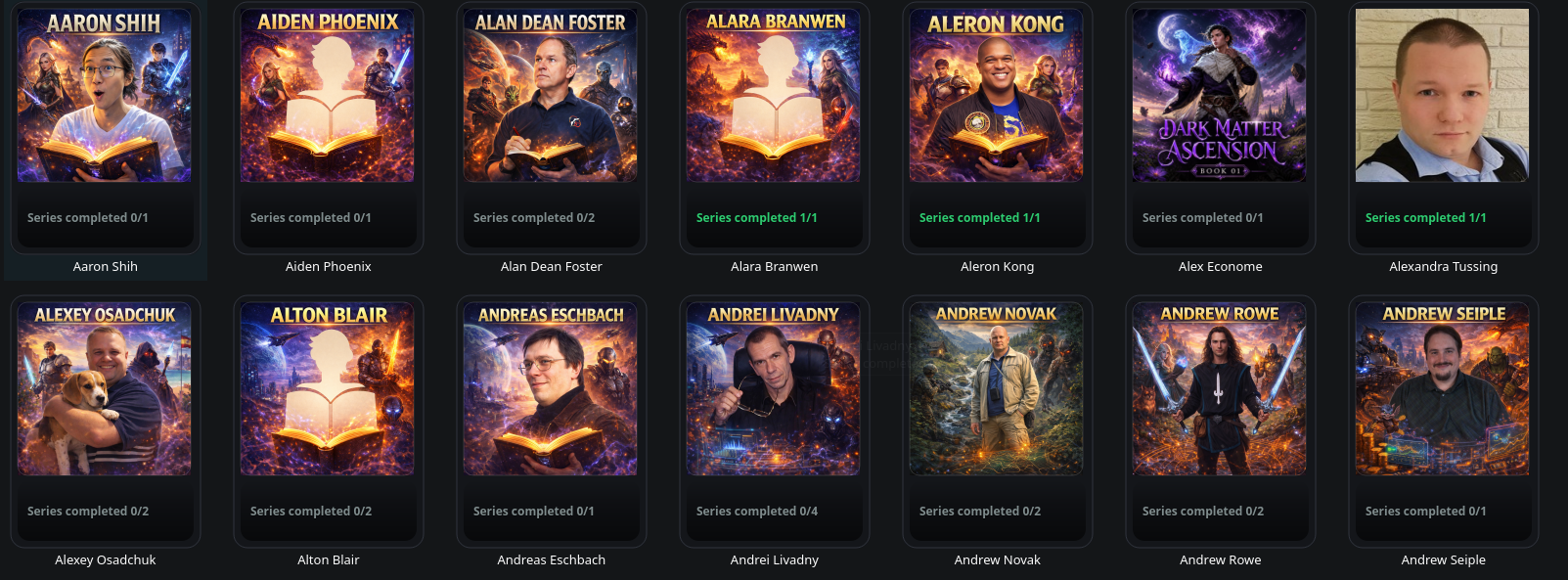
The app gives you a visual gallery for authors and series, lets you edit MP3 metadata, handles covers, renames files, tracks read status, tracks ownership progress, tracks Goodreads status, tracks Audible review status, and can scan multiple audiobook folders into one combined view.
Gallery
Browse authors and series visually with cover tiles instead of digging through folders and filenames.
Editor
Edit the metadata fields that matter for audiobooks, including title, author, series, track order, disc number, year, genre, composer, and description.
Tracker
Track read status, owned/in-series status, Goodreads updates, and Audible reviews from the same interface.
Why this is not like the usual audiobook tools
Most audiobook tools are built around playback. They answer one question: can the file play? That is useful, but it does not solve the real library problem.
A serious audiobook collection has other problems. Metadata is wrong. Covers are missing. File names are inconsistent. Series are incomplete. Goodreads might not be updated. Audible reviews might be forgotten. Books might be read, half-read, or not yet started. A normal player does not care about that. This app does.
Normal tools think like players
They focus on playback, resume position, streaming, or server access. That does not fix the library itself.
This thinks like a collection manager
It focuses on structure, tags, covers, progress, ownership, review status, series completeness, and whether the collection still makes sense later.
The big new thing: multiple library folders
The newer installed version is not locked to one audiobook folder. It can scan multiple library roots together into one combined gallery. That means you can keep different audiobook groups in different places and still browse them from one app.
For example, you can keep homemade audiobooks in one folder, store-bought audiobooks in another folder, and older archived audiobooks somewhere else. The settings window lets you add, remove, and reorder those folders.
Audiobooks/
├── Store Bought/
│   └── Author / Series / Files
├── Homemade Audiobooks/
│   └── Author / Series / Files
└── Archive/
    └── Author / Series / Files
The important part is that the app scans those folders together and builds one visual library from them. That is a major step beyond the older version.
Settings that finally matter
The installed version has a real settings window. The current settings focus on library folders, with a left-side settings layout already prepared for future options. You can add folders, remove folders, move folders up, and move folders down.
- Add every audiobook folder you want included in the gallery.
- Remove folders that should no longer be scanned.
- Reorder folders without rebuilding the whole app.
- Save the selected library roots locally so the app can restore them later.
- Keep a General page ready for future configuration options.
Smart artist and series sorting
The newer build adds sorting controls directly into the gallery views. Artists and series are no longer just shown A to Z. You can sort them by practical library status.
Artist sorting
- A–Z
- Newest updated
- Oldest updated
- Most completed series
- Least completed series
- Most series
- Fewest series
Series sorting
- A–Z
- Newest updated
- Oldest updated
- Completed first
- Incomplete first
- Most progress
- Least progress
- Most owned
- Missing most
This is not cosmetic. Sorting by completion, missing ownership, update time, and progress turns the app into a practical maintenance dashboard instead of just another pretty cover wall.
Portable tracking inside the MP3 files
This is one of the most important differences in the newer version. The old style of tracking was mostly local JSON files. The newer version can also write app-specific state into MP3 ID3 custom text frames.
ASM_TRACK_ID
ASM_WATCHED
ASM_GOODREADS
ASM_AUDIBLE
That means tracking can become more portable because the state can travel with the MP3 file itself. If the file is moved, copied, or reorganized, the tracking information is not only trapped in one local path database.
The app still keeps legacy JSON support for older data, but the newer design is stronger: read status, Goodreads status, and Audible status can be embedded into the file as custom ID3 TXXX fields.
The tracker system
AudiobookShelfManager tracks more than whether a book exists. It tracks the state of the collection.
Read / watched
Mark a track or book as read/watched. The app counts that progress across the album or series.
Owned / expected
Set how many parts an album or series should contain, then compare that with how many files you actually own.
Goodreads
Mark whether Goodreads has been updated. This is counted as part of the album/series status.
Audible
Mark whether an Audible review is done. It is tracked separately so it does not pollute the Goodreads count.
Legacy migration
The newer stores can still read older JSON tracking data and migrate useful state into embedded MP3 flags.
Rename-safe
When the app renames a file, it also moves the watched and review state so the tracking does not get lost.
Album and series progress at a glance
The gallery tiles are not just covers. They can show library status directly on the artwork. That makes the app useful as a dashboard, not only as a browser.
Artist tiles can also show series completion, for example:
Series completed 8 / 15This is the kind of library overview most audiobook players never bother with.
Metadata editing built for audiobooks
The app edits MP3 metadata directly. It supports the fields that matter for organizing audiobooks: title, artist, album, album artist, year, genre, comment, composer, disc number, track number, and total tracks.
Core identity
Title, artist, album, album artist, year, and genre.
Audiobook description
The comment field can be used as an audiobook description, useful when browsing later.
Order control
Track number, total tracks, and disc number help keep series and multi-part books ordered correctly.
The app writes standard ID3 frames for these fields and saves MP3 tags as ID3v2.3. That gives better compatibility with many older tools and players.
Automatic file renaming
After saving metadata, the app can rename the selected audio file using a readable audiobook-friendly pattern.
NN - Title - Artist.mp3Example:
01 - The Frozen Road - Kiba Snowpaw.mp3It removes unsafe filename characters, avoids overwriting existing files by adding numbered suffixes, and can rename matching sidecar cover images together with the audio file.
Cover handling
Covers are treated as part of the library. The app can use folder covers, artist covers, sidecar covers, and embedded artwork.
Folder covers
Looks for common names such as cover, folder, front, and album inside the series folder.
Artist covers
Can use artist-level images such as artist, artist-cover, cover, folder, and front.
Sidecar covers
Can use an image next to a track with the same filename as the audio file.
Embedded covers
Can read embedded cover art and embed selected images into MP3 files.
Gallery fallback
If one cover source is missing, it tries another before falling back to a generic icon.
Cleaner UI helpers
The newer version separates icon drawing and tile overlay logic into helper code, making the UI cleaner to maintain.
Broken ID3 repair helper
The app contains a repair helper for a specific kind of broken MP3 tag: an ID3 header whose declared tag size is larger than the actual file.
In that case, the app can look for the first real MP3 frame and rewrite the file from that point. This is not a universal audio repair tool, but it is a practical fix for a real-world tag corruption case that can break metadata reading or saving.
How the library is structured
The app expects a sane folder structure. Each selected library root contains author folders. Each author folder contains series or album folders. Each series or album folder contains MP3 files.
Library Folder/
├── Author Name/
│   ├── Series or Album Name/
│   │   ├── 01 - First Book.mp3
│   │   ├── 02 - Second Book.mp3
│   │   └── cover.jpg
│   └── Another Series/
│       └── 01 - Another Book.mp3
└── Another Author/
    └── Album Name/
        └── 01 - Book Title.mp3
The newer version can scan several of these library folders together.
Why this is hard to replace
You can find apps that play audiobooks. You can find apps that edit tags. You can find apps that show covers. You can find scripts that rename files. But finding one Linux-focused tool that combines cover gallery browsing, metadata editing, file renaming, multiple library folders, series completion, read status, ownership status, Goodreads status, Audible review status, and portable embedded MP3 tracking is not normal.
That combination is the point. This app is not trying to be a generic media player. It is trying to solve the boring, annoying, long-term maintenance problem that comes with owning and managing a real audiobook collection.
Linux Flatpak build
The public GitHub build information may lag behind the installed version, but the project is intended to run as a Linux desktop app through Flatpak.
Install build tools
sudo apt update
sudo apt install git flatpak flatpak-builder -y
flatpak remote-add --if-not-exists flathub https://flathub.org/repo/flathub.flatpakrepo
Clone the project
git clone https://github.com/kibasnowpaw/AudiobookShelfManager.git
cd AudiobookShelfManager
Build and install
rm -rf build-dir .flatpak-builder
flatpak-builder --force-clean build-dir io.github.kibasnowpaw.BookLibConnect.json
flatpak-builder --install --user --force-clean build-dir io.github.kibasnowpaw.BookLibConnect.json
Run
flatpak run --user io.github.kibasnowpaw.BookLibConnectUninstall
flatpak uninstall --user io.github.kibasnowpaw.BookLibConnectAlpha warning
This is still alpha software. It is not a finished commercial product. The version installed on my own system may be newer than the public GitHub version.
Back up your audiobook library before using metadata editing, cover embedding, file renaming, or embedded tracking. This app works directly with MP3 files. That is powerful, but direct file modification should always be treated carefully.
What still needs work
- More polish around the public GitHub release.
- Better documentation for the newer installed version.
- Search for authors, series, and tracks.
- More statistics and dashboards.
- More testing across Linux distributions and desktop environments.
- Better handling for very large collections.
- More cleanup around old internal names and older music-style wording.
- Possible migration tools for older tracking data.
Who this is for
This is for people who keep local audiobook libraries and actually care about keeping them clean. It is for people who fix their own tags, keep their own covers, manage their own folders, and want to know what they own, what they have read, and what still needs cleanup.
If you only stream audiobooks from one app, you probably do not need this. If you maintain your own collection, this is built for that kind of work.
Why I made it
I made this because I could not find the exact tool I wanted. I wanted an audiobook gallery. I wanted a metadata editor. I wanted cover handling. I wanted file renaming. I wanted ownership tracking. I wanted read tracking. I wanted Goodreads tracking. I wanted Audible review tracking. I wanted multiple library folders. I wanted it local. I wanted it on Linux.
Instead of waiting for someone else to build that exact thing, I started making it myself. It is not final, but it already solves a real problem.



Leave a Reply